


.png?width=520&height=294&name=Untitled%20design%20(30).png)
Legal Tech
Immigration software pricing is commonly based on “per user, per month.”
Unfortunately, sometimes that’s just the headline number vendors show you. Additional costs show up later in the form of per-case fees, add-on capabilities, AI fees, onboarding charges, and long contracts that lock you in before you fully understand what you’re paying for.
Immigration casework is a deadline-driven and detail-sensitive world. And immigration software is essential to help firms save time on administrative tasks and reduce errors so they can deliver a better client experience. But figuring out which software provides those benefits and at what price is difficult. That’s because vendors package features differently, and some even hide their prices behind “contact sales” messages, which makes comparing tools frustrating.
This guide makes the process easier for you.
It breaks down pricing for several types of immigration software that you may be considering for your practice:
- Immigration case management (for forms, document collection, client communications, compliance)
- AI research and drafting (for summaries, petition drafting, document analysis)
-
- Immigration practice management (for billing, calendaring, payments, reporting)
Then, we compare how leading platforms price those tools. We show you what’s included, what’s extra, and what questions you need answered before you sign up.
By the end, you’ll be able to sanity-check published pricing and spot hidden fees. This will help you build a shortlist of software that fits your firm’s needs, rather than trying to force-fit your firm into a vendor’s packaging.
How much does immigration software cost?
When firms talk about immigration software pricing, they’re usually comparing headline numbers. However, that only scratches the surface.
In this guide, pricing means the total cost to run your immigration workflows, not just the subscription fees you see on a landing page.
Most platforms start with a per-user subscription. You’ll see monthly and annual options, with annual billing discounted in exchange for the longer commitment.
However, that base price can change quickly once you layer in the features your firm needs.
The final price of immigration software depends on a few factors.
What’s included in the base price
Some systems include immigration forms, questionnaires, client portals, reporting, and sufficient data storage in their base plan. Others charge separately for those pieces or restrict them to higher tiers.
That’s how two tools can both cost “$80 per user” and deliver completely different functionality once you’re live.
How much add-ons cost
Add-ons further distort the picture. Billing and payment processing, specialized immigration workflows, integrations, and AI features are often priced outside the available plans. What looks reasonable on a pricing page can jump significantly once you add all the capabilities you need.
One-time fees
On top of that, some companies charge additional one-time fees for services like onboarding and training your team to use the software. And if you're migrating data from your old system, that will almost always be a paid service. Sometimes those fees are modest. Regardless, you need to account for them in your budget.
Other pricing “gotchas”
Other pricing “gotchas” to keep an eye out for include minimum user requirements, which can saddle smaller firms with extra seats they don’t want or need. Also, be wary of vendor lock-in, where companies make it hard for you to switch to a different tool by requiring multi-year contracts or putting up roadblocks to migrating your data out of their systems.
This is why we advocate for transparent pricing. Vendors that publish plan tiers, list the features available in each tier, and are clear about their premium feature pricing help you estimate total costs before committing to a sales process.
Tools like eimmigration or CampLegal do this well. Others require you to call their sales team just to understand the baseline costs. That makes it much harder to comparison shop and slows down your evaluation process.
4 types of tools that show up in an immigration firm’s budget
Often, one tool isn’t sufficient to run every facet of an immigration firm’s business. Instead, firms will build a tech stack with different tools designed to handle specific tasks.
Those tasks roughly break down into these four categories.
1) Immigration case management systems
This is the foundation of most firms’ tech stack.
Immigration case management systems are built for the work that sits at the heart of immigration law. This includes tasks like form preparation, intake questionnaires, document collection, evidence gathering, deadline tracking, and client communication.
The best of these tools are tailored specifically to immigration law workflows. That’s a better use of your software spend than trying to retrofit generic legal software to fit your needs.
2) AI research and drafting tools
Common use cases for AI tools in immigration law include summarizing long documents, extracting client data from PDFs, and drafting or refining petitions and support letters.
Pricing for these tools usually scales based on users or usage. You’ll find meaningful cost differences between tools focused on making legal research faster versus those built for drafting immigration-specific content.
This category often sits outside case management, even though some case management systems include AI features. So it’s important to budget for it explicitly.
3) Practice management tools
Practice management tools cover your operations. Here you’ll find functionality for billing clients, tracking time among your team, and calendaring.
Some immigration platforms include these capabilities natively, while others assume you’ll integrate a third-party tool. If you’re using a third-party tool, understanding how it connects with your case management system is critical. Otherwise, you risk fragmenting your data across multiple systems, which can add lots of administrative time on the back end.
4) Payment processing
Payments and processing tools support how firms collect fees from clients. This category includes legal-specific payment processors such as LawPay that integrate with billing or client portals.
Because payment processing is often handled by a different vendor, it’s commonly evaluated as its own line item when firms review their overall software stack.
Immigration software pricing: Case management tools
Immigration case management software is where most firms spend the bulk of their technology budget. This means pricing differences here have a big operational impact.
eimmigration pricing (case management + forms + clients + practice tools)
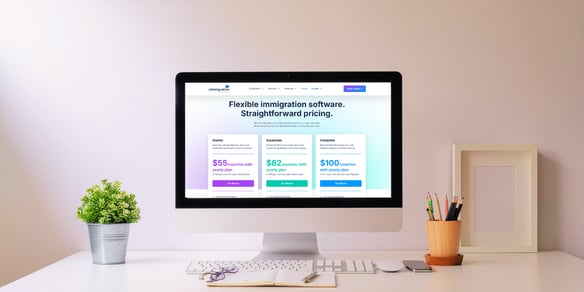
eimmigration uses a straightforward, per–user pricing model with published tiers and no per-case fees.
All plans come with the platform’s full set of standard immigration features. This includes immigration forms, questionnaires, portals, basic reporting, and other practice tools.
The three plan tiers are:
- Starter ($60 per user/month or $55 per user/month when billed annually): Designed for solo practitioners and small teams. This tier includes one premium feature of your choice and 10 GB of storage per user.
- Essentials ($90 per user/month or $82 per user/month when billed annually): Built for growing firms that need more flexibility. This tier includes four premium features and unlimited storage.
- Complete ($110 per user/month or $100 per user/month when billed annually): Intended for organizations that want maximum capacity. This tier includes all the modules, unlimited storage, API access, an extra hour of private training, an annual success review, and more.
Non-profits qualify for 50% the full monthly rate when signing up for an annual subscription.
The premium features cover functionality like e-filing, custom reporting, USCIS case status tracking, billing and payment processing, secure SMS and WhatsApp communications, and email syncing.
Every customer receives two personalized trainings, plus ongoing access to email and phone support. Additionally, eimmigration can import your data from a long list of other case management platforms starting at just $1,000.
DocketWise pricing
DocketWise uses a tiered, per-user pricing model where functionality is progressively unlocked at higher plans. Unlike platforms that include all core capabilities by default, DocketWise gates several operational, AI, and administrative features behind its Pro and Advanced tiers.
The three plan tiers are:
- Basic ($79 per user/month): Sufficient for firms that need core case management and immigration forms. This tier includes case tracking, client portals, intakes and questionnaires, calendaring, and time tracking.
- Pro ($109 per user/month): Designed for firms with more complicated operational needs. This tier adds CRM and lead management, e-filing, e-signatures, built-in texting, QuickBooks integration, and AI writing and document assistance.
- Advanced: ($129 per user/month): Built for large, national firms. This tier adds multi-location support, advanced user and admin permissions, and enhanced file size limits. Advanced clients also get priority support.
You'll need to inquire about their data import, onboarding, and training fees.
INSZoom pricing (Mitratech INSZoom)
Mitratech does not publish pricing for its immigration software INSZoom. Public pricing information varies by directory, so firms should confirm all details directly during their evaluation.
Based on listings from third-party directories like Capterra and Software Advice, INSZoom uses per-feature pricing.
The five tiers are:
- Basic ($50 per feature/month)
- Pro Law ($100 per feature/month)
- Pro Corporation ($150 per feature/month)
- Enterprise Law ($180 per feature/month)
- Enterprise Corporation (Pricing listed as “contact vendor”)
INSZoom positions itself as a comprehensive immigration case management platform. During evaluation, you should confirm whether pricing is per user or per feature, and specify what features are included in each package. Also, be sure to ask about term length. Many law firms report being locked into five-year contracts.
LawLogix pricing
LawLogix, an Equifax Workforce Solutions product, also does not publicly post tiered pricing.
Firms may license immigration case management separately or as part of a broader Equifax Workforce Solutions ecosystem. This likely affects which features are available and the cost.
LawLogix is geared toward larger employers and emphasizes compliance, scalability, and support.
If you reach out to sales to learn more, you should ask detailed questions about contract length, implementation fees, whether features like portals and forms are included, and whether the software limits the number of reports you can produce.
CampLegal pricing
CampLegal publishes its pricing publicly and offers clear plan tiers with monthly or annual billing. Pricing is per user, per month, with no per-case fees.
Their platform emphasizes workflow automation and unlimited document storage.
The two plan tiers are:
- Essentials ($69 per user/month): This tier includes case and client management, a legal calendar, multilingual templates, client dashboards, document generation, custom workflows, and questionnaires.
- Pro ($89 per user/month): In addition to everything in the Essentials tier, Pro unlocks USCIS receipt and visa bulletin monitoring, more questionnaires, Zapier integrations, e-filing, and AI-powered features. The Pro plan also includes CampLegal’s client-facing app.
CampLegal offers personalized onboarding, data migration, hands-on training, and dedicated support. It doesn’t disclose pricing for these add-ons.
Integrations with tools like Google Calendar, Microsoft Outlook, accounting software, and LawPay are supported on both plans. More advanced automation is available on the Pro plan.
During evaluation, be sure to verify what is included in each plan, how in-depth their automation features are, how their client portals work, and whether their data storage is truly unlimited.
LollyLaw pricing
LollyLaw does not publish pricing on its website. Firms must request pricing directly from the vendor. According to Capterra, LollyLaw pricing starts at $120 per user per month.
LollyLaw’s platform offers automated form filling, multilingual client intake, payments, and customized workflows.
You get access to client portals, questionnaires, billing, payments, and reporting, though they don’t publicize what's considered standard versus an add-on.
Firms evaluating LollyLaw should ask the company’s sales team what features are included, how pricing works, and what payment processing or other transaction fees LollyLaw assesses. Also, ask whether LollyLaw provides services like data migration or onboarding.
Filevine pricing
Filevine doesn't publish fixed pricing tiers. Instead, pricing is tailored based on the number of users and the add-ons your firm selects. To get a quote, you’ll have to contact sales.
Filevine is a general legal case management platform, not an immigration-specific one. It allows users to track matters, manage tasks, and organize documents.
You’ll have to configure Filevine to support immigration cases through custom workflows, fields, and integrations, rather than relying on prebuilt immigration forms and questionnaires. You should also budget additional time and cost for setup compared to immigration-specific platforms.
Immigration software pricing: AI research & drafting tools
Firms use AI for specific, time-intensive tasks like summarizing long documents, extracting information from intakes, and drafting.
VisaLaw.ai pricing
VisaLaw.ai is an immigration-specific AI tool focused on research, drafting, and document analysis.
VisaLaw’s two products are GEN Core and GEN Drafts.
Core lets firms conduct legal research within a curated dataset of statutes, regulations, and case law. You can also upload files to a library and then use AI to query and analyze them. The tool also summarizes and translates documents.
Drafts helps users generate long-form petition letters, briefs, and expert letters for complex cases using an array of templates. You can bulk upload large document sets and use AI to rename and categorize them.
- Core: $220 per month for an annual plan. It includes legal research, summarization, a curated immigration law library, document analysis, translations, a custom prompt library, unlimited uploads, and unlimited reference letters.
- Core + Drafts: $480 per month with an annual plan. It includes all Core features, plus 10 petitions per month, exhibit list review and assembly, and customized onboarding for your firm.
- Enterprise: Custom pricing. Includes all Core and Draft features, plus unlimited drafts, custom prompt engineering support, and in-person onboarding.
Thomson Reuters CoCounsel pricing
CoCounsel’s AI assistant is built for all types of legal professionals.
You can upload a knowledge base of documents to CoCounsel, then query the AI assistant to find answers, get analysis, and summarize information.
It’s built on large language models (LLMs) and then constrained to specific legal uses. That means it emphasizes security and client confidentiality. CoCounsel is commonly used in litigation, corporate, and transactional practices.
This tool isn’t designed as an immigration form or petition-drafting tool, and it’s not a substitute for immigration-specific workflows.
CoCounsel doesn’t publish simple pricing tiers. Instead, cost is determined by factors like your sector, number of users, contract length, and whether you bundle it with other products.
During evaluation, you’ll want to verify pricing, minimum seat requirements, and which CoCounsel capabilities are included in your quoted plan.
Claude pricing (Anthropic)
Claude is Anthropic’s proprietary LLM. Though not immigration-specific, firms often use it for drafting, summarization, and translation.
There are three plan tiers for individual users.
- Free: Intended for light, exploratory use. This tier includes basic chat, writing, and analysis.
- Pro ($20 per user/month): This tier is effective for regular professional use. You can create projects to organize your work and integrate Claude with tools like Google Workspace. You also have access to more powerful versions of Claude.
- Max ($100 per user/month): Max users get 20x more usage than Pro users. This tier also adds memory across conversations and offers priority access and early feature releases.
Each tier is subject to usage limits that vary based on Anthropic’s available compute.
For teams and organizations, Anthropic also offers Team and Enterprise plans. These don’t come with public pricing. Each plan boasts higher usage limits per user, role-based permissions, single sign-on features, and more security features.
You’ll need to spend significant time with Anthropic to understand what your usage limits look like, what the pricing is, and what the company’s client data policies are, since you’ll be working with confidential information.
Immigration software pricing: Practice management tools
Practice management tools aren’t immigration-specific, but they often fill the business gaps that many immigration software products have.
These tools can overlap with immigration platforms, which is why it’s important to understand what you’re getting so you don’t pay for features twice.
Clio pricing
Clio is a general legal practice management platform widely used across practice areas, including firms that handle immigration matters.
Clio uses a per-user pricing model with multiple tiers.
The plan tiers are:
- EasyStart ($59 per user/month) — This tier is built for firms just starting to transition from manual processes. It covers functions like time tracking, billing, document management, calendaring, and client communications.
- Essentials ($99 per user/month) — This tier adds document and matter templates, a client portal, and broader integrations.
- Advanced ($139 per user/month) — If your firm wants more automation and reporting, consider this tier. It adds workflow automation, advanced reporting, and enhanced onboarding and support.
- Expand ($169 per user/month) — At this level, you also get Clio Grow, Clio’s CRM and intake product. This helps with lead management and improves marketing ROI.
Clio also relies heavily on paid add-ons. This includes products like Clio Grow, Clio Draft, Clio Accounting, and their AI-powered features. These add-ons materially affect total cost and are often required to match functionality that immigration-specific platforms often include natively.
MyCase pricing
MyCase combines case tracking, billing, payments, and client communication in a single system. It is widely used by small and mid-sized firms.
The three plan tiers are:
- Basic ($49 per user/month) — The basic package includes case and contact management, task tracking, a client portal, time and expense tracking, billing and online payments, calendaring, basic financial reporting, and unlimited document storage.
- Pro ($99 per user/month) — This tier adds legal AI tools, client intake management, text messaging and more integrations.
- Advanced ($119 per user/month) — At this level, users have access to document syncing, more automation, expanded AI capabilities, and split billing
MyCase offers add-ons like accounting and an SEO-friendly website.
PracticePanther pricing
PracticePanther prioritizes automation and accounting tools to help solo practitioners and small firms get paid faster.
It packages its three products based on firm size:
- Solo ($59 per user/month) — Built explicitly for solo outfits, PracticePanther offers time tracking, e-signatures, unlimited data storage, and native payments tools that helps attorneys provide a client experience usually reserved for larger firms.
- Essential ($79 per user/month) — At this tier, PracticePanther lets you sync your email and calendars, and create custom fields within forms.
- Business ($99 per user/month) — The largest firms can take advantage of the software’s Zapier-enabled automations to create powerful workflows at the touch of a button. This tier includes built-in LEDES and UTBMS codes for the accounting teams. You can also create custom reports so you have the data you need at your fingertips.
Onboarding and data migration are guided by a dedicated account manager so you can start confidently using PracticePanther on day one.
LawPay pricing
LawPay is a legal-specific payments and billing platform. It’s a common line item in an immigration firm’s budget because many case management and practice management tools rely on LawPay for compliant payments.
LawPay uses a flat $19 per month platform fee plus transaction-based processing fees.
This fee covers unlimited users. The platform handles all the necessary IOLTA and PCI compliance. You can create reconciliation reports and build customizable payment pages for clients.
There’s no contract. Billing is month-to-month.
LawPay integrates with most other legal software on the market and reduces risk around commingling client funds. It also supports faster payouts, scheduled payments, and payment plans.
How to choose the right mix for your firm
You won’t find a single “best” immigration software stack. The right mix instead depends on your firm’s needs.
If you want an immigration-first, all-in-one system
Begin with immigration-specific case management platforms, not general legal software. These systems are built around the forms and questionnaires you deal with daily. Compare platforms based on what’s included by default.
You want to make sure the solution you choose includes the form templates, storage, reporting, and client portals you need to deliver a smooth client experience and keep your data organized—no matter which plan you go with.
If you want to add AI
Be explicit about what you want AI to do for your firm.
Some tools focus on research, summarization, translation, and document analysis. Others are built for structured drafting of documents like petition letters and briefs.
Each of these is a different use case, so you’ll find they're priced differently and may only need to be licensed selectively, rather than firmwide. Be sure to budget for AI seats by role, not headcount. Senior attorneys and drafting-heavy roles typically need access. Everyone else usually doesn’t.
If you already run on a practice management platform
If your firm already uses a platform like Clio, MyCase, or PracticePanther, resist the urge to force immigration workflows into it.
General practice management tools are strong at billing, calendaring, and firm operations. But immigration software is better at template forms and data collection specific to your practice area. Trying to make one system do both usually increases both cost and friction.
Make your software shortlist
Now that you understand how immigration software pricing actually works, it’s time to move from research to decisions.
To start, shortlist 3-5 tools based on how they fit your firm’s needs.
For tools with “contact sales” style pricing, ask for an itemized proposal. Push for per-user costs that include your required add-ons, and make sure to consider any onboarding fees or usage limits that may apply.
Convert everything to a monthly, per-user number that includes payment processing fees, AI seats, add-ons, and other one-time costs amortized over a year. This is the only way to get an honest comparison of each tool.
Once you’ve done that, the right stack for you will become clearer.
.png?width=520&height=294&name=Untitled%20design%20(20).png)

.png?width=552&height=246&name=Capabilities%20CTA%20Image%20(1).png)